Building a Simple Operator App with Softr AI
I built a simple operator app in Softr for a real home renovation company that is just getting started. The goal was a practical daily operations hub for leads, estimates, projects, schedules, files, PDFs, and follow-ups.

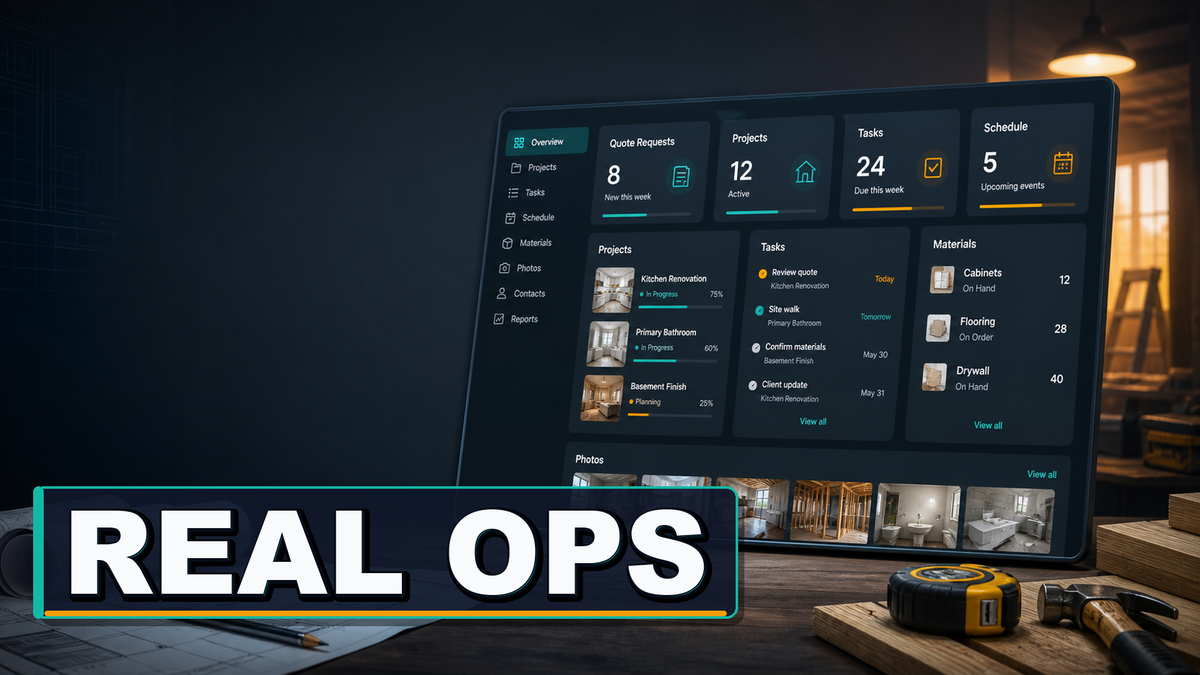
Softr sponsored this video. I used Softr AI Co-Builder to create the first version of a real operator app, then refined the interface, data, files, and workflows in the Softr UI.
Links Mentioned in This Video
The operator problem
Most small service businesses do not struggle because the actual work is unclear. They struggle because the operator has to hold the whole company in their head. Calls, quotes, schedules, materials, client texts, photos, estimates, and follow-ups all end up scattered across different places.

For this build, I used a real home renovation company as the example: Pearson Home Company in Duluth, Minnesota. They are just getting started on their own after years of hands-on service work, so the goal was not to give them a giant piece of enterprise software. The goal was to build something simple enough to understand and useful enough to open every day.
Starting with the AI Co-Builder
I started in Softr with a blank account and used the AI Co-Builder to create the first version of the app. Instead of picking a generic template, I wrote out what the business needed: an operator dashboard, lead tracking, estimates, project stages, scheduling, customer-facing updates, and basic business visibility.

One practical trick here was using ChatGPT to help draft the prompt. I gave it the client’s website and asked it to write a Softr prompt for a complete operator dashboard. That gave me a much more detailed starting point than I would have typed from scratch.
Answering setup questions
Softr did not just take the prompt and immediately dump me into a finished app. It asked a short set of setup questions, which is useful because the structure matters. For this client, I wanted the app to follow the customer journey: lead, estimate, design, build, and warranty.
That lifecycle-first approach makes more sense for a contractor than a pile of disconnected modules. A service operator usually wants to know where each job stands, what needs attention, and what the next step is. The software should support that mental model instead of forcing the business into a generic CRM shape.
What Softr generated
Once the app started generating, Softr created the database, tables, columns, pages, and interface pieces automatically. The database became the foundation: projects, leads, estimates, schedules, crews, files, and other records could all live in one place.

The interface is what makes that database usable. Instead of asking the operator to stare at rows and columns all day, Softr generated dashboards, project pages, scheduling views, pipeline screens, and detail pages that feel more like a normal business app.
The owner dashboard
The most important page in this kind of app is the dashboard. For a small service business, the dashboard should answer one question: what needs attention today? In the generated app, the owner view included schedule information, leads needing follow-up, at-risk projects, revenue numbers, outstanding AR, and won estimates.

That is the difference between a useful operator app and a pretty demo. The operator should not have to click through five different tools to remember who needs a call, which job starts soon, and what project is in trouble.
Editing the app after AI does the first pass
The AI-generated first version is only the start. I spent part of the video showing the Softr editor because that is where the app becomes specific to the client. The interface tab works like a page builder, while the database tab shows the actual records and fields behind the scenes.

That split is important. You can manage the underlying business data, then decide which pieces should appear on each screen for the owner, office manager, crew, or client. You do not need to show everyone every field just because it exists in the database.
Matching the client’s brand
For a client-facing or team-facing app, small visual details help. I used the client’s website as a reference, grabbed the dark green accent color, and adjusted the Softr theme so the app felt like it belonged to the company.
This does not need to become a full brand project. The point is to avoid handing over something that feels generic. Matching the main accent color, button style, and overall feel makes the app more likely to be adopted by the people who actually need to use it.
Adding PDFs and proposal files
For a renovation or handyman business, PDFs matter. Quotes, proposals, invoices, scopes of work, and approvals often end up as PDFs, so I wanted those surfaced directly inside the app instead of buried in an email thread.

In the estimates area, I showed how to expose a proposal PDF field and place it near the estimate title. I also showed a second approach using an item action button that opens a file. Either way, the practical goal is the same: let the operator or client get to the document without hunting around.
Making leads easier to follow up
One of the easier wins was changing a leads table into a more glanceable list view. A table can be useful, but it can also be too dense when the operator just wants to see who needs attention.
By changing the block type and adding sorting by status, the lead screen becomes more useful for daily work. If the operator wants to see only leads that need follow-up, that view should be obvious and fast.
Workflows and document automation
Softr also has built-in workflows, which opens the door to automating parts of the business process. In the video, I outline a workflow where a submitted estimate can send data to Docs Automator, generate a PDF proposal, and attach that proposal back to the right record.

That is the kind of workflow I would probably build in a dedicated follow-up video because it has more setup involved. But the important idea is simple: the app is not only a place to view records. It can also move work forward.
Why not just vibe code it?
I also touched on why I would not tell most small service operators to vibe code an entire business system from scratch. User accounts, authentication, database structure, permissions, file storage, and security are not small details when client data and business operations are involved.
Softr still gives you room to customize and even use AI inside the interface, but the core plumbing is handled by a platform that is built for this kind of app. For an operator who wants to run a business, that tradeoff makes sense.
One place to run the day
This build is not about replacing every tool a service business might use. It is about giving the operator one practical place to start: leads, estimates, projects, schedules, files, client updates, and follow-ups.
For a home renovation company that is just getting started, that kind of simple operations hub can be more useful than a giant CRM. Start with the app structure, refine the pieces that matter, and keep it understandable enough that the business will actually use it.
Frequently Asked Questions
What is an operator app?
An operator app is a simple internal tool that helps the owner or day-to-day operator manage leads, jobs, schedules, files, tasks, and follow-ups from one place.
Can Softr be used for a contractor or renovation business?
Yes. Softr can be used to build dashboards, project pages, client portals, lead forms, estimates, and file views for service businesses like contractors, remodelers, and handyman companies.
Do you need to know how to code to use Softr?
No. Softr is designed for no-code app building. You can use AI Co-Builder to create the first version, then edit pages, blocks, fields, and permissions in the Softr UI.
Why use Softr instead of a spreadsheet?
A spreadsheet can hold data, but it usually does not give you clean role-based interfaces, client views, forms, workflows, file displays, and user permissions in one place.
Can clients log into a Softr app?
Yes. Softr supports user accounts and permissions, so you can create client-facing views that show only the right project updates, documents, and next steps.
Can Softr generate PDFs for quotes or invoices?
Softr can store and display PDF files, and you can connect it with tools like Docs Automator to generate PDFs from app data.
Is Softr a good fit for a brand-new service business?
It can be, especially if the business needs something simple and affordable before investing in custom software or a heavier industry-specific system.
Get Dave's Toolbox
The tools I actually use, every Tuesday. Free. No spam.
No cost. No spam. Unsubscribe anytime.