Snoooz Review: AI Email Assistant for Your Inbox
Snoooz is an AI assistant for your inbox that can draft replies, route messages, categorize emails, and create follow-ups. I tested the AppSumo deal to see where it feels useful, where I would use guardrails, and which tiers actually make sense.

Snoooz launched as part of AppSumo’s Sumo Day event. If you want to try the lifetime deal, use the link below and compare the tiers carefully before buying.
Snoooz
AI assistant for email categorization, drafting, routing, follow-ups, and inbox automation.
Small teams, creators, founders, and businesses with repetitive email workflows.
AI email drafting tools, shared inbox automation, helpdesk macros, and custom AI email agents.
What Snoooz Is Trying to Do
Snoooz is trying to turn your inbox from a never-ending pile of manual decisions into something closer to an automated system. It can categorize incoming messages, draft replies, route emails to the right person, schedule follow-ups, and in some cases send messages automatically.
That is useful, but it is also the category where I want the most guardrails. A bad AI summary is annoying. A bad AI email sent to a customer, sponsor, lead, or vendor can create a real problem. So I looked at Snoooz less as a magic “answer all my email” button and more as a system for controlled email automation.
Connecting Inboxes and Workspaces
In the demo I had both a Gmail account and an iCloud account connected. Snoooz supports Gmail, Outlook, and IMAP/SMTP accounts, though IMAP/SMTP requires at least tier two on the AppSumo deal.

The workspace model matters because most people do not answer every inbox the same way. My personal email, work email, sponsorship email, and support-style email all need different rules, tone, labels, and training data. Snoooz lets you segment those preferences by workspace instead of forcing one generic assistant across everything.
Categories and Rules Are the Core Workflow
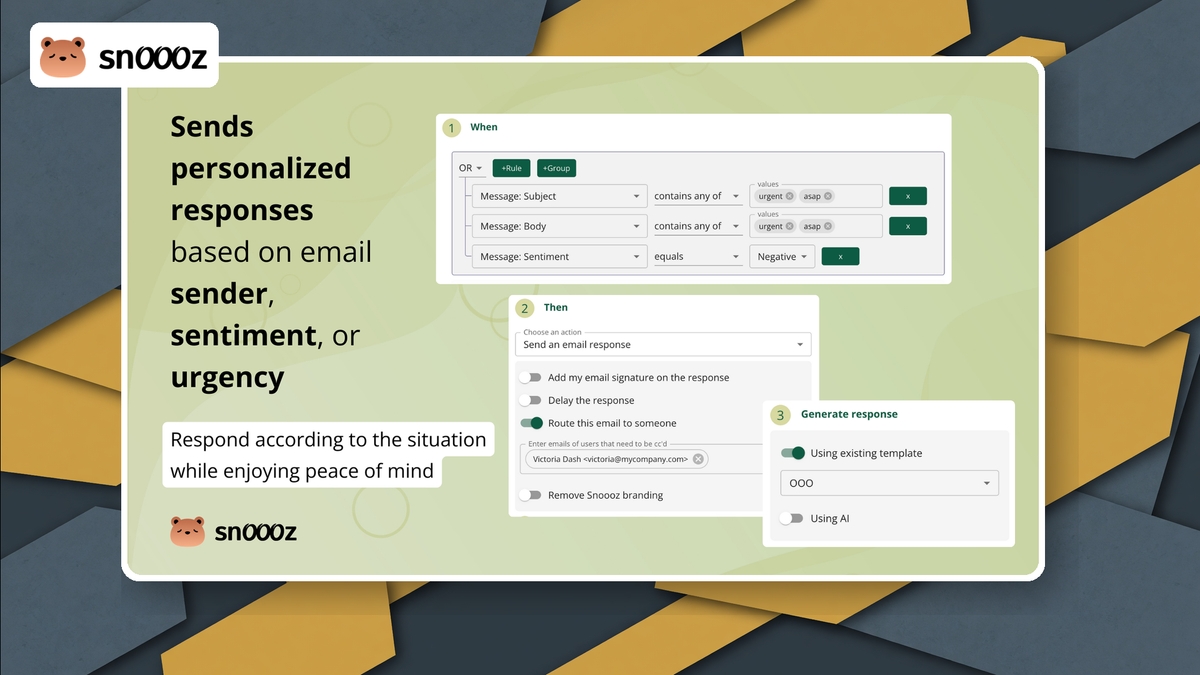
My preferred way to use Snoooz starts with categories. You let the system classify email into buckets like urgent, needs reply, FYI, notifications, or promotional. Then you build rules that decide what happens when a message lands in one of those categories.

That rule layer is where Snoooz becomes more than a writing helper. A promotional email might just get labeled. A support request could generate a draft. A message meant for an associate could be forwarded. And a time-sensitive customer email could trigger a more specific workflow.
I Would Start With Drafts, Not Auto-Send
Snoooz can send replies automatically, but that is not where I would start. In the video, I showed an example where a rule could send an immediate reply, delay it, or create a draft. For real business email, drafts are the safer starting point.
That gives you the time-saving benefit without pretending the AI should have full authority on day one. Let it triage, label, and draft. Then review the responses until you understand where it is reliable and where it still needs your judgment.
Testing Rules Before Trusting Them
One of the better features is rule testing. You can send a mock message through the system and see which category it receives, which rule it matches, and what response Snoooz would create.

That matters because rule priority can change the outcome. Snoooz evaluates rules in order, and exclusion rules override inclusion rules. If you build a serious automation setup, the test button is not optional—it is how you keep the assistant from behaving differently than you expected.
Training Snoooz With Your Own Business Data
The data sources section is where Snoooz gets more interesting. You can add FAQs, upload PDFs, connect help-desk tools like Intercom or Zendesk, use Document360, scan a website, or bring in structured information that explains your business.

This is the difference between a generic email writer and something that can actually answer customer questions. If Snoooz knows your policies, offers, service details, and common answers, the drafts should be more useful than a generic “happy to help” response.
The Gmail Extension Is Useful for Human-in-the-Loop Writing
Snoooz also has a Chrome extension for Gmail. In the video I used it to improve a quick reply and to draft a message from scratch. That is a lower-risk use case because you are still sitting in the composer reviewing the output.
For a lot of people, this may be the feature they use every day while the deeper automation runs more carefully in the background. Improve this sentence, make this more concise, draft a quick response, use the knowledge base—those are practical wins even before you trust automatic sending.
MCP Support Is the Nerdy Part I Like
Snoooz includes MCP guidance so agents like Claude, ChatGPT, OpenClaw, or Hermes can connect and help configure things. That is the part that caught my attention because it means the inbox assistant does not have to live only inside a web dashboard.

For people already using AI agents, MCP opens the door to configuring rules, adding knowledge, and managing workflows through an assistant. In my case, Hermes handled that connection cleanly, which makes Snoooz more interesting than a simple browser extension.
Plans, Pricing, and the Tier Problem
The AppSumo tiers matter a lot here. Tier one is limited enough that I would not treat it as the obvious buy. Tier two unlocks IMAP/SMTP and delayed auto replies. Tier three is where more of the training and BYOK-style features start to make sense.

AppSumo points to tier four as the sweet spot for most features and usage, while tier five and tier six get into unlimited credits and the remaining higher-end features. If you are serious about email automation, I would compare the tiers based on inbox count, credits, data sources, MCP, follow-ups, and whether you need your own model/API key.
What Still Gives Me Pause
My biggest hesitation is not that Snoooz is bad. It is that email is high-stakes. I do not want any tool instantly sending odd replies to real people before I have tested the rules and reviewed a lot of drafts.
I also prefer local and private inference long-term, especially for email. Snoooz is a cloud-hosted platform, so that is not the same as running an assistant entirely on your own machine. They do mention security, GDPR, and EU data residency options, but you still need to decide whether your inbox belongs in a hosted AI system.
Who Snoooz Makes Sense For
Snoooz makes the most sense if your inbox has repeatable patterns: common support questions, sales inquiries, lead follow-ups, vendor routing, sponsorship triage, or repetitive internal requests. If every message requires deep personal judgment, you will get less automation value.
For small teams, the routing and category features may be just as important as the writing. Even if Snoooz only labels, prioritizes, drafts, and forwards the right things, that can save time without giving the AI complete control.
My Take on Snoooz
Overall, I am excited about Snoooz because the category is exactly where email needs to go: an assistant that knows your business, understands your inbox, and can help turn repetitive email into a workflow.
I would not flip on auto-send for everything immediately. I would connect an inbox, build categories, start with drafts, test rules heavily, and train it with real business data. If it holds up over time, then I would slowly give it more responsibility.
Frequently Asked Questions
What is Snoooz?
Snoooz is an AI email assistant that can categorize messages, draft replies, route emails, create follow-ups, and optionally send replies automatically based on rules.
Can Snoooz send emails automatically?
Yes, Snoooz can send replies automatically if you configure it that way. I would start with draft mode first so you can review responses before trusting auto-send.
Does Snoooz work with Gmail and Outlook?
Snoooz supports Gmail and Outlook, and it can also work with IMAP/SMTP accounts on the appropriate AppSumo tier.
What AppSumo tier should I consider for Snoooz?
Tier one is limited. I would look closely at tier two or higher for IMAP/SMTP and delayed replies, and tier three or four if training data, MCP, BYOK, and broader automation features matter to you.
Can Snoooz learn from my business data?
Yes. Snoooz can use sources like FAQs, PDFs, websites, Zendesk, Intercom, Document360, and other knowledge sources depending on your plan.
Is Snoooz safe for customer email?
It can be useful, but I would use guardrails. Start with drafts, test rules, keep Snoooz disabled while experimenting, and only enable automatic replies when you trust the workflow.
Does Snoooz support MCP?
Yes, Snoooz includes MCP guidance so AI agents can connect and help configure or operate parts of the system.
Get Dave's Toolbox
The tools I actually use, every Tuesday. Free. No spam.
No cost. No spam. Unsubscribe anytime.