RobinReach on AppSumo: AI Social Desk + MCP Walkthrough
RobinReach is an AI social media manager on AppSumo. I walked the full setup — accounts, compose, AI tools, scheduling — and the MCP layer that lets my agent run the desk.

RobinReach
AI social media manager: connect major networks, compose and schedule posts, media library, analytics, and MCP/agent control on higher tiers.
Creators and small teams who want one social desk—and especially anyone who wants to run posting from an AI agent via MCP.
Buffer, Hootsuite, Publer, native apps + custom agent glue
Why I cared about this one
I've been following Gary V for something like twenty years and I still suck at social media. That's on me. I don't post enough, and I'm not on enough platforms — especially by the “document everything” standard. I'm not going full lifestyle-broadcast, but I do want to grow online without building another half-finished social stack myself.
I've even vibe-coded my own helpers. They always die the same death: too many API keys, too many monthly fees, too much glue code between the goal (show up online) and the work (maintain integrations). When RobinReach showed up on AppSumo, I wanted a real social desk I could operate — and, ideally, hand to an agent.
The AppSumo deal (and the tier trap)


At recording time, RobinReach was in AppSumo's Deal Is Right collection for AppSumo Plus members, with that window running through July 24, 2026. After that it opens more broadly, just not at the same price. The Plus entry point I called out is about $69.
Important caveat before you smash buy: that entry tier does **not** include MCP or API access. Those land on a higher tier that more than doubles the cost. If you're buying this because you want agent control (Claude Code, Hermes, OpenClaw, etc.), budget for the tier that unlocks MCP. If you only want a classic social scheduler UI, the lower tier may be enough.
This video is sponsored by AppSumo. They don't dictate the score or the complaints. Link if you want to support the channel: https://daveswift.link/robinreach
Interface first impressions

I'm going to be blunt: I don't love everything about the UI. It has that classic social-media-manager look — bubbly, rounded, a little stuck in a previous generation of SaaS. The whole category is overdue for a visual refresh.
That said, the tools work. Think toolbox more than single magic button: pieces that can run together or separately depending on how you operate.
Connecting accounts

I connected Facebook, Instagram, LinkedIn, TikTok, YouTube, and X/Twitter before hitting record. Smooth. No auth loops, no mysterious “try again on mobile” dead ends. That's not a small thing — paid social tools break OAuth all the time.
If account connect is flaky on day one, I lose trust fast. Here it just worked.
Compose, previews, and per-network options

Compose is restrained — one clear path instead of six screaming CTAs. You write once, pick profiles, and get previews per network. Facebook can go post/reel/story and supports a first comment (useful because links in the main Facebook post still get punished). Instagram and LinkedIn have their own toggles too.
What I wanted and didn't fully get: true per-network body copy in the basic compose flow. If Instagram needs “link in bio” and Facebook needs “link in comments,” you're still massaging one message carefully or leaning on repurposing later. Workable, not perfect.
AI optimize, media, and publishing for real


AI optimize rewrites your post, but there's no clean undo back to your original draft — annoying when the “optimized” version is denser, hashtag-heavy, and emoji-loaded. I'd love simple toggles: hashtags off, emoji off.
Media library + integrations (Drive, GIFs, etc.) are solid. Built-in AI images exist with plan limits; the sample I got looked instantly AI-generated and I couldn't iterate the image prompt the way I wanted. I dropped in my own blog featured image instead (WebP needed a quick convert).
When I published, it first looked like a draft/schedule quirk until I realized brand preferred times were steering the next slot. Once I confirmed publish, Facebook (with comment), Instagram, and LinkedIn all landed cleanly — including a 16:9 image on Instagram without the old phone hop.
Brand settings, calendar, and the rest of the toolbox

Brand settings cover tone, mission, preferred days/times — that's what made my post wait for the next slot instead of firing instantly. Calendar/drafts, content pillars, templates, RSS, and store-sync style automation are part of the broader toolbox. I also poked analytics and engagement views; enough to operate day to day.
RobinGen (the in-app chat helper) is closer to a chat UI than a web-browsing agent. When I asked it to promote my newsletter, it stayed generic and didn't actually learn the page. Fine as a draft helper; don't expect autonomous research.
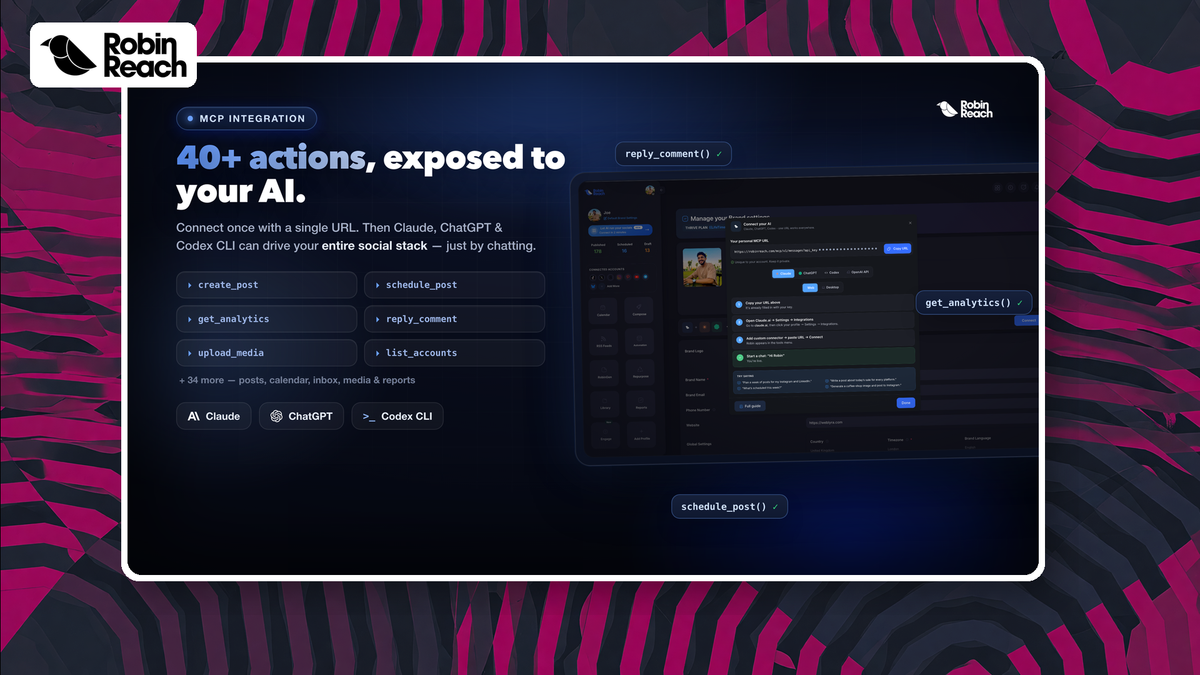
MCP is the part I actually care about


The integrations page is really “here's MCP, plus recipes for the tools you already use.” I hooked it to Hermes (my agent, Lloyd). From chat it could see accounts, LTD plan, pipeline items, drafts, schedules, bulk create, engagement, style learning, article-to-posts, and analytics — with guardrails around validate-before-publish and brand voice.
I spent most of the video in the GUI because that's what most buyers need to see. For me, the long-term win is running social ops from the agent desk instead of living inside another bubbly dashboard.
My take
Score: **7.9/10**. Feature-packed social manager with smooth network connects and real multi-platform publishing. UI isn't my taste. AI writing/images need more control. MCP on the higher tier is the reason I'm keeping it as a daily driver candidate.
If my posting frequency and engagement go up from here, you'll see it on the channels. That's the real scoreboard.
Frequently Asked Questions
Is the $69 tier enough?
For classic scheduling/compose across connected networks, maybe. If you want MCP/API for agents, plan on the higher tier — that's called out clearly in the video.
Does it actually post to Instagram without the phone dance?
In my test, yes — including a 16:9 image that published cleanly.
Is this sponsored?
Yes, by AppSumo. They don't control the review points or the 7.9 score.
Get Dave's Toolbox
The tools I actually use, every Tuesday. Free. No spam.
No cost. No spam. Unsubscribe anytime.