Puzzle Workflow Mapping Review: Visual Business Documentation Tool
Discover Puzzle, the workflow mapping platform that helps businesses visually document processes, team structures, and software tools in one place.

Exclusive deal available during Sumo Day - Puzzle offered at significant discount with limited time offer. This is the same AppSumo sale featured in the video.
Puzzle
Visually maps business workflows, teams, roles, and software tools in a single source of truth. Integrates with AI assistants via MCP for automated documentation updates.
Small businesses seeking workflow visibility, companies implementing AI automation, business owners tired of scattered documentation, agencies wanting to visualize client operations, tech-savvy entrepreneurs building systems.
Notion for workflow mapping, traditional project management tools, stand-alone organizational chart creators
Introduction to Puzzle: Your Business' Source of Truth
In most businesses, finding accurate and up-to-date documentation about how things actually get done can be frustrating. Procedures might live in multiple places - a few SOPs in one location, supporting spreadsheets in another, with crucial changes announced in Slack messages that never make it back into the official documentation. That leaves many companies dependent on that one employee who knows how stuff actually works, leaving the business vulnerable if they're unavailable or leave the company. Puzzle addresses this challenge by providing a platform for creating complete visual representations of business processes, team structures, software tools, and role assignments in one central source of truth.

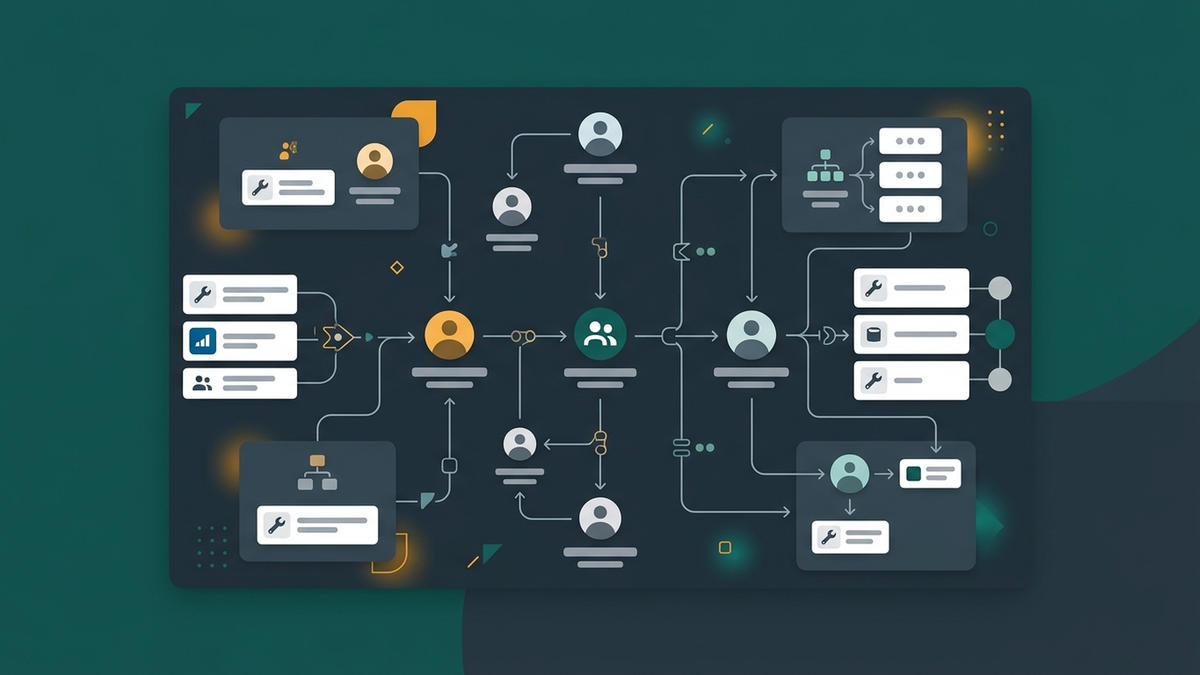
Puzzle is fundamentally a workflow mapping platform that allows you to map out every action in your business. But it goes beyond basic workflow visualization by integrating team management features - allowing you to add your entire staff with department structure, roles within departments, and specific assignments for process responsibilities. The platform also lets you incorporate all the software tools you use for each team and each workflow, so you can see who has access to what, and how different software components contribute to specific business processes.
Understanding the Core Value Proposition
What initially attracted me to Puzzle was its potential synergies with AI tools through its MCP (Model Context Protocol) connector. This means AI assistants like Claude or specialized custom agents can access the complete business map I've constructed in Puzzle. This includes information about organizational structure - who performs which roles, how business functions interconnect, and software dependencies. This enables AI tools to both utilize organizational context in their decision-making and potentially help maintain the business documentation as operations evolve.

For businesses of any size, one of the greatest challenges is the risk inherent in knowledge concentration on one or two individuals who understand how everything operates. Puzzle mitigates this by making organizational knowledge explicitly visual. This creates a structured foundation that can be accessed by both humans and AI tools. Even if you run a one-person company experimenting with AI automation, Puzzle can help formalize your business processes into a coherent map that any AI system can understand.
Exploring the Puzzle Interface
Puzzle organizes everything around your Organization, which contains multiple workspaces. Each AppSumo plan level (including the lowest tier) provides unlimited workspaces, which is particularly useful if you run a service-based business with clients. You could create separate dedicated workspaces to visualize technology recommendations for specific clients, making complex technical suggestions more comprehensible compared to traditional written proposals.

Within each workspace, Puzzle maintains a consistent set of five main functional areas accessible via top tabs: Workflows, Teams, People, Tools, and Changelog. Unlike flexible platforms such as Notion where you have unlimited creative freedom, Puzzle provides predefined structure within each workspace. Every workspace follows the same framework, ensuring consistency in how your various business entities are documented.
Workflows: Documenting What You Do
The Workflows tab represents the core of your operational processes. Here I can visualize services, actions, and procedures. A workflow consists of a series of steps organized in sections. While sections appear as nondescript entries when heavily zoomed out (appearing as 'one', 'two', 'three'), the detail emerges when I zoom in more closely to see individual steps within each section. This hierarchical structure allows me to break complex business processes into manageable components.

Each workflow step includes important attribution information: who is responsible for performing the step, which tools are utilized for that particular action, and what type of content or output is generated. The workflow design supports visual connections between steps that indicate the sequence of operations, helping me understand how processes flow from initiation to completion.
Teams: Defining Your Business Structure
Teams represent the organizational divisions within your business – groups like design, HR, development, or operations. Each team contains roles that specify particular positions or responsibilities. In my demonstration, the Editorial Studio team contains three roles: host (which I hold), video editor, and final approval authority. The interface allows me to assign specific roles within teams and connect them to corresponding workflow responsibilities.

I can easily define new teams or add roles within existing teams. Each role can be associated with salary information if desired, though I found this wasn't essential for my immediate use case. The primary benefit lies in creating clear accountability and role structure that corresponds directly to the work and responsibilities depicted in your Workflows.
People: Managing Individual Accounts
The People tab functions as a complete organizational chart system. It focuses specifically on individual employees rather than collective team units described in the teams section. I can add employees with contact information, specify employment status types (employee, contractor, vendor, board member, or custom classifications), and upload photos. When I associate individuals with roles in the teams section, their photos appear to visually reinforce organizational hierarchy.

Relationships between people can also be documented through visual connection lines that show reporting relationships. I simply drag and drop these connecting lines to indicate who reports to whom, and I can label the connections to specify what type of interactions occur between positions. The interface provides color customization options to further differentiate these relationship types.
Tools and Software Management
The Tools tab catalogs every software product used in your business operations. These tools can be arranged in logical groupings for clarity. I organized my software tools into groups like 'Intake Sources', 'Blueprint and AI Context', and 'Production and Publishing'. Within each group, specific software tools can be added and categorized based on their usage status: actively used, canceled, or considered for future evaluation.

One particularly valuable aspect of the tools section's design is its ability to track reasons for tool cancellation. Over time, businesses typically cycle through technology tools, so maintaining documentation about why certain tools weren't successful prevents repetitive mistakes. The interface also supports recording renewal dates and license costs to help manage software procurement budgets.
Documentation Evolution and Updates
The Changelog tab maintains a history of changes made to your business documentation. Though maintaining these updates manually can prove tedious for busy businesses, Puzzle is designed to work with AI agents to automate the documentation maintenance process. This automation helps ensure that your organizational map evolves in parallel with actual business operations.

AI Integration Through MCP Connection
Puzzle's MCP connector enables integration with AI assistants like Claude, which I implemented with my custom agent called Lloyd. This integration allows my AI agent to interact directly with the platform, such as creating organizational structures and updating documentation. The AI assistant can receive specific commands to add new tool categories or manage other business documentation, as demonstrated when I asked Lloyd to create a 'Favorite Automation Tools' group.
This type of AI integration proves particularly powerful because the agent can draw upon extensive contextual information from your existing documents, system configurations, and business processes to help construct accurate business maps. When I want to implement a significant operational change or replace AI systems, having this comprehensive documented reference provides an invaluable foundation for transitioning processes and maintaining continuity.
Lloyd's Perspective on Puzzle Utility
Consulting my AI assistant Lloyd regarding Puzzle's utility revealed that he believes the platform serves as beneficial infrastructure rather than a comprehensive solution. He identified Puzzle's primary strength as providing a visual representation for 'invisible automation work', particularly the routing that occurs between different AI systems and business tools. The visual nature of the workflow connections provides a more intuitive understanding than examining complex configuration code or markdown documentation files.
Lloyd's assessment aligns with my own observations that Puzzle excels at making abstract business processes tangible and shareable among team members. It bridges the gap between purely manual operations and automation-focused systems by providing visual accountability for both human-performed and machine-performed tasks.
AppSumo Plan Structure and Feature Availability
AppSumo offers Puzzle in several tiered pricing levels with increasing user limits and enhanced features. Tier 1 includes support for 1 user while upper tiers provide 3, 6, and 10 users respectively. The majority of core features are available at all price levels, with more advanced functionality reserved for the higher pricing tiers.
Features that remain restricted to higher tiers include list views that present workflows and tools in table formats, conditional coloring capabilities that change element appearance based on status conditions, tool cost tracking mechanisms, process costing functionality for calculating total operation expenses, entity and attribute capabilities for more granular software usage specification, and third-party system integrations for services like Zapier, Make, and HubSpot. I particularly appreciate that the Claude MCP connectivity feature remains available to all buyers regardless of tier selection, as this represents a fundamental value proposition of the platform.
Final Verdict: 7.8/10
Puzzle succeeds in creating visual structures for business processes that previously existed only in informal documentation or individual knowledge. The platform effectively combines workflow visualization, team organization, software inventory, and change tracking into one cohesive system. The MVP features provided at the basic tier are sufficient for solo business usage or early-stage teams.
The most significant drawbacks I encountered involve navigation and interface organization. The platform often loses your preferred viewing zoom level and location when moving between different sections. The process of organizing AI-generated workflow connections frequently requires extensive manual adjustment due to poor initial placement. Limited templating and a lack of automatic layout optimization also contribute to time investment requirements for maintaining visual organization. Despite these navigation concerns, the core value proposition of combined workflow and organizational visualization makes Puzzle worthy of serious consideration, especially for businesses incorporating AI automation.
The AI MCP connectivity feature, available across all pricing tiers, adds considerable value for businesses that rely on automated systems and want to visualize and maintain their operational processes. Combined with AppSumo's pricing, Puzzle offers an attractive path towards comprehensive business documentation.
Frequently Asked Questions
What is the MCP connector in Puzzle and why is it important?
The MCP (Model Context Protocol) connector allows AI tools like Claude to directly access and interact with your Puzzle workspace. This means AI assistants can read your entire organizational structure, workflow maps, team structures, and update them automatically. This connectivity allows for dynamic business documentation that evolves with your operations.
Is Puzzle suitable for a solo business owner or small team?
Yes, Puzzle is excellent for solo operators and small teams. The basic AppSumo tier supports a single user and includes core workflow mapping, team structure, and software tool documentation features. The visual nature of the platform helps solo business owners identify process inefficiencies and document what they do for potential future scaling.
How does Puzzle compare to Notion for workflow documentation?
Unlike Notion, where you have unlimited flexibility, Puzzle provides a structured framework with five specific tabs: Workflows, Teams, People, Tools, and Changelog. Puzzle is more focused on visual process mapping while Notion is better for flexible documentation. Puzzle wins for visual representation of complex business relationships.
Can I export or share my Puzzle documentation with clients or team members?
Yes, Puzzle includes sharing features that allow you to create shared views of specific sections of your workspace. You can create custom views of portions of your workflows and optionally add password protection, making it ideal for sharing with clients without exposing sensitive internal operations throughout your entire organization map.
How difficult is it to import existing business documentation into Puzzle?
With AI integration, the import process can be partially automated. An AI assistant with access to your existing documents (PDFs, SOPs, project notes) can interpret this information and transform it into Puzzle's visual format. Manual entry provides more control but the AI-assisted approach significantly speeds up the migration process.
Get Dave's Toolbox
The tools I actually use, every Tuesday. Free. No spam.
No cost. No spam. Unsubscribe anytime.