Lunacal Review: AI Booking Pages That Market Your Business
Lunacal is an AI-powered booking platform that transforms your scheduling page into a full marketing experience. I tested workspaces, team permissions, routing forms, and the AI page builder to see if it lives up to the hype.

Lunacal
AI-powered booking platform that turns scheduling pages into customizable marketing experiences with widgets, themes, team management, and routing forms
Service-based businesses, consultants, coaches, agencies, and teams who want branded booking pages with advanced customization
Calendly, TidyCal, Acuity Scheduling
What Is Lunacal?
Most booking tools do the same thing. Pick a date, pick a time, confirm, done. Lunacal takes a different approach by turning your booking page into what's essentially a marketing landing page with scheduling built in.
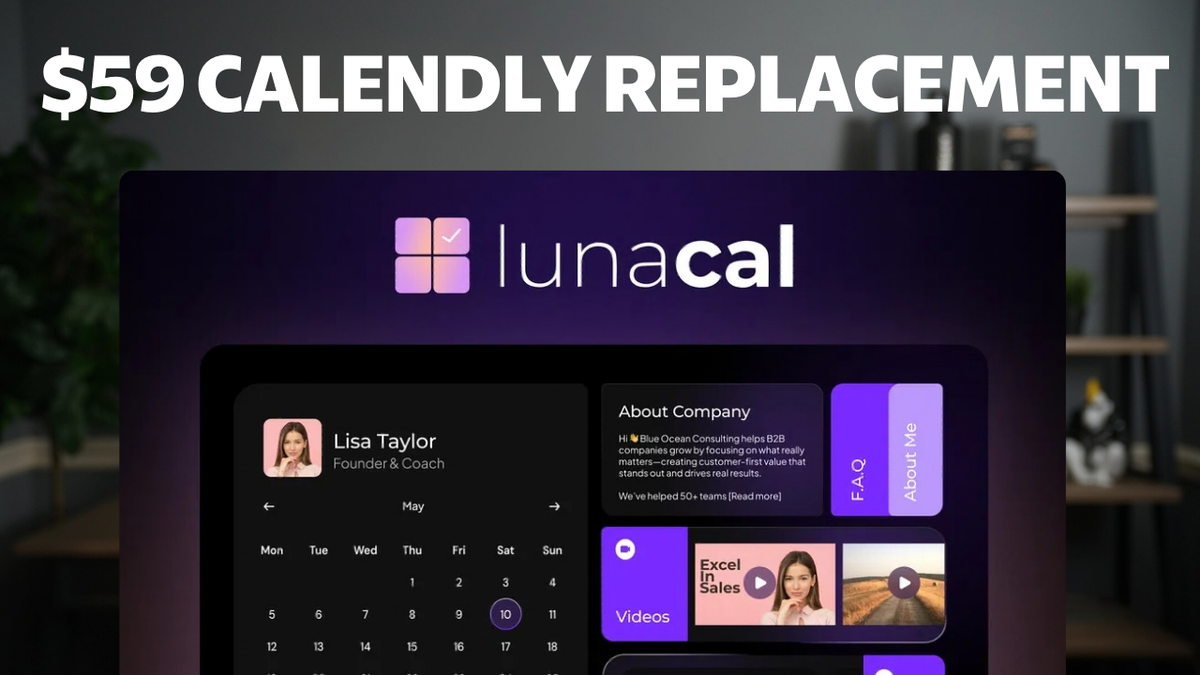
Using AI, Lunacal generates branded booking pages with customizable widgets — you can embed videos, testimonials, about sections, and more. The idea is that the marketing experience doesn't stop when someone clicks "Book Now."
It's available as a lifetime deal on AppSumo right now, with four tiers ranging from basic solo use to managing up to 30 businesses. The tool supports both virtual and in-person appointments with integrations for Google Meet, Zoom, Microsoft Teams, and even FaceTime.
Workspaces and Team Management

Even on tier one, you get two users and two workspaces (companies or team spaces). You can switch between personal and team workspaces from the dashboard, and each workspace has its own booking pages, event types, and settings.
Adding team members is straightforward — enter their email, choose member or admin permissions, send the invite. The team booking page shows all available members so clients can pick who they want to book with.
If you're a service provider managing multiple clients, this is where things get interesting. Tier four gives you up to 30 businesses, which means you could offer booking as a service to solopreneurs and charge a monthly fee on top of your one-time investment.
Customizing Your Booking Page

This is where Lunacal stands out from tools like Calendly or TidyCal. Your booking page isn't just a calendar — it's a full page with widgets you can add and remove. Want to embed a YouTube video? There's a widget for that. Testimonials? About section? All available.
You get pre-built themes to start with, and you can customize colors to match your branding. There's also an AI page designer — give it a prompt and it'll generate a complete color scheme and layout for you.
Each team member can have their own personalized booking page that's separate from the team page. So your brand page looks one way, but individual team members can customize their own experience.
The AI-Generated Content Problem

When I signed up, Lunacal's AI went out and found information about me, then wrote an about section and generated testimonials for my booking page. The about section was decent — mostly accurate, though not my writing style and heavy on emojis.
The testimonials, though, were completely fabricated. They looked real but weren't based on actual reviews. That's a problem. They should ask if you have testimonials to import rather than making them up.
It's clear they're using a lower-cost LLM for the content generation, and it shows. The output needs heavy editing before you'd want to publish it. Not a dealbreaker since you can customize everything, but it's not the polished onboarding experience they're advertising.
Creating Events and Booking Types

Event creation offers three modes: one-to-one, round robin (distributes bookings evenly across a sales team), and collective (schedules only when all team members are available).
Each event type gets its own URL with the team member's username in the slug, so you can create direct booking links for email signatures or specific campaigns. You can also enable group bookings for classes or workshops, and set up multi-session packages — perfect for trainers or coaches who want to sell bundles of five or ten sessions.
Meeting locations support Google Meet, Zoom, Microsoft Teams, FaceTime, in-person addresses, phone calls, or custom links. The integrations actually create the meeting on the platform, so you don't have to manually set up a Zoom call for each appointment.
Payments and Charging for Appointments
If you charge for your time, Lunacal integrates with both PayPal and Stripe. You set the price per event type and can offer coupon codes for discounts.
You'll need to connect your payment accounts through the integrations screen first, but once set up, payments are collected at the time of booking. This is standard for scheduling tools at this level, but it's good to see both major payment processors supported.
Routing Forms: The Hidden Gem

This is one of my favorite features and something I haven't seen in other booking tools. Routing forms act like a pre-booking questionnaire with conditional logic — based on a client's answers, they get directed to the right event type automatically.
So if someone isn't sure whether they need a 30-minute consultation or a full 60-minute strategy session, you build a routing form that asks the right questions and sends them where they need to go. It saves customer support time and prevents people from booking the wrong appointment type.
The UX for building routing forms could use some work — you set up the destination before the condition, which feels backwards. But once you understand the flow, it's powerful. Note that routing forms are only available on tier three and above.
Team Member Permission Overrides
This is the feature I've never seen anywhere else. When you set up an event type, you can allow individual team members to override specific settings like minimum notice time, buffer between appointments, and availability.
Why does this matter? Maybe one salesperson works best with back-to-back calls all day. Another needs a 15-minute break between appointments to prepare. With most tools, you're forced to pick one configuration for the entire team. Lunacal lets each person optimize for how they actually work.
The granularity here is impressive — just about every appointment setting can be toggled as member-editable. For larger teams, this alone could justify choosing Lunacal over the competition.
Integrations and Embedding

Calendar sync works with Google, Microsoft, and Apple iCloud. CRM integrations include HubSpot and PipeDrive with custom field mapping. There's also Zapier for automation and Google Tag Manager for tracking pixels.
For deploying on your website, you get embed options for both event types and routing forms: inline embed, floating pop-up button, page pop-up, or email embed. Every event type also has its own QR code for offline sharing.
SMS notifications are available as an add-on — not included in the lifetime deal, but at roughly one cent per message, it's affordable enough. You set it up under account settings and buy credits as needed.
Tier Comparison: Which Plan Should You Get?

Most features are consistent across all tiers, but there are a few important differences. Custom domains require tier two ($169) or above. Multi-session packages and bundles are also tier two and up.
Routing forms — which I think are one of the best features — are locked to tier three and above. And custom SMTP, which lets notifications come from your own domain for better deliverability and branding, is tier four only.
If you're a solopreneur who just needs a nicer booking page, tier one or two will do. If you're running a team-based service business, tier three for routing forms or tier four for custom SMTP and managing up to 30 businesses is where the real value is.
Lunacal vs TidyCal
I use TidyCal personally and it's a solid, simple booking tool built by the AppSumo Originals team. If you want dead-simple scheduling with minimal setup, TidyCal is hard to beat.
Lunacal is for a different audience entirely. If you want your booking page to double as a marketing page, need per-member permission controls for a team, or want routing forms to direct clients to the right service, Lunacal is the clear choice.
The trade-off is complexity. Lunacal has a steeper learning curve because there are so many options. Switching between personal and team settings can get confusing at times. But for service businesses that need that level of control, it's worth the investment.
Migrating from Calendly
If you're currently on Calendly and thinking about switching, Lunacal has a built-in import tool. Go to Settings > General > Import Calendly Settings, log into your Calendly account, and it pulls everything over.
You'll need to do this on a per-user basis, but it's significantly faster than rebuilding everything from scratch — especially if you're moving a whole team.
Final Verdict
Lunacal is a genuinely impressive booking platform, especially for service-based businesses that want more than a basic calendar widget. The customizable booking pages, team member permission overrides, and routing forms set it apart from everything else in the LTD space.
The weak spots are the AI-generated content (fabricated testimonials are not okay) and the learning curve that comes with having so many options. The UI can be confusing when switching between personal and team contexts.
I'm giving Lunacal an 8.3 out of 10. It's a strong tool with genuinely unique features, and the lifetime deal pricing makes it easy to justify trying it out. If you run a service business with a team, this is worth a serious look.
Frequently Asked Questions
What is Lunacal and how is it different from Calendly?
Lunacal is an AI-powered booking platform that turns your scheduling page into a marketing landing page with customizable widgets, video embeds, testimonials, and branded themes. Unlike Calendly's minimal approach, Lunacal focuses on the visual and marketing experience of your booking page.
Does Lunacal offer a lifetime deal?
Yes, Lunacal is currently available as a lifetime deal on AppSumo with four tiers. Tier one starts with two users and two workspaces, while tier four supports up to 30 businesses and includes custom SMTP.
What are Lunacal routing forms?
Routing forms are pre-booking questionnaires with conditional logic. Based on a client's answers, they get automatically directed to the correct event type. This feature is available on tier three and above.
Can Lunacal team members customize their own settings?
Yes, Lunacal has a unique per-member permission override system. Admins can allow individual team members to adjust their own availability, buffer times, minimum notice, and other appointment settings independently.
Does Lunacal integrate with payment processors?
Lunacal integrates with both Stripe and PayPal for collecting payments at the time of booking. You can set per-event pricing and offer coupon codes.
Can I migrate from Calendly to Lunacal?
Yes, Lunacal has a built-in Calendly import tool. Go to Settings > General > Import Calendly Settings and log into your Calendly account to transfer your data. This needs to be done per user.
What calendar apps does Lunacal sync with?
Lunacal syncs with Google Calendar, Microsoft Outlook/365, and Apple iCloud Calendar to check availability and prevent double bookings.
Does Lunacal support custom domains?
Custom domains are available on tier two and above. Tier one users will use the default Lunacal URL for their booking pages.
Get Dave's Toolbox
The tools I actually use, every Tuesday. Free. No spam.
No cost. No spam. Unsubscribe anytime.