DFIRST Review: All-in-One AI Marketing Platform
DFIRST brings image generation, video creation, text writing, and campaign workflows under one roof. Here's my honest review of this AppSumo lifetime deal.

DFIRST
All-in-one AI marketing platform with image, video, text, and campaign workflow tools
Marketers, solopreneurs, and small teams who need to create content across multiple channels
Canva, ChatGPT, individual AI generation tools

AppSumo's AI Week features the best AI-powered tools at their lowest prices — but only until February 27th. Plus members save an extra 10% on every purchase.
What is DFIRST?
DFIRST is an all-in-one AI marketing platform designed to replace the half-dozen apps most marketers juggle daily. Instead of switching between separate tools for copywriting, image generation, video creation, and campaign management, DFIRST puts everything under one roof.

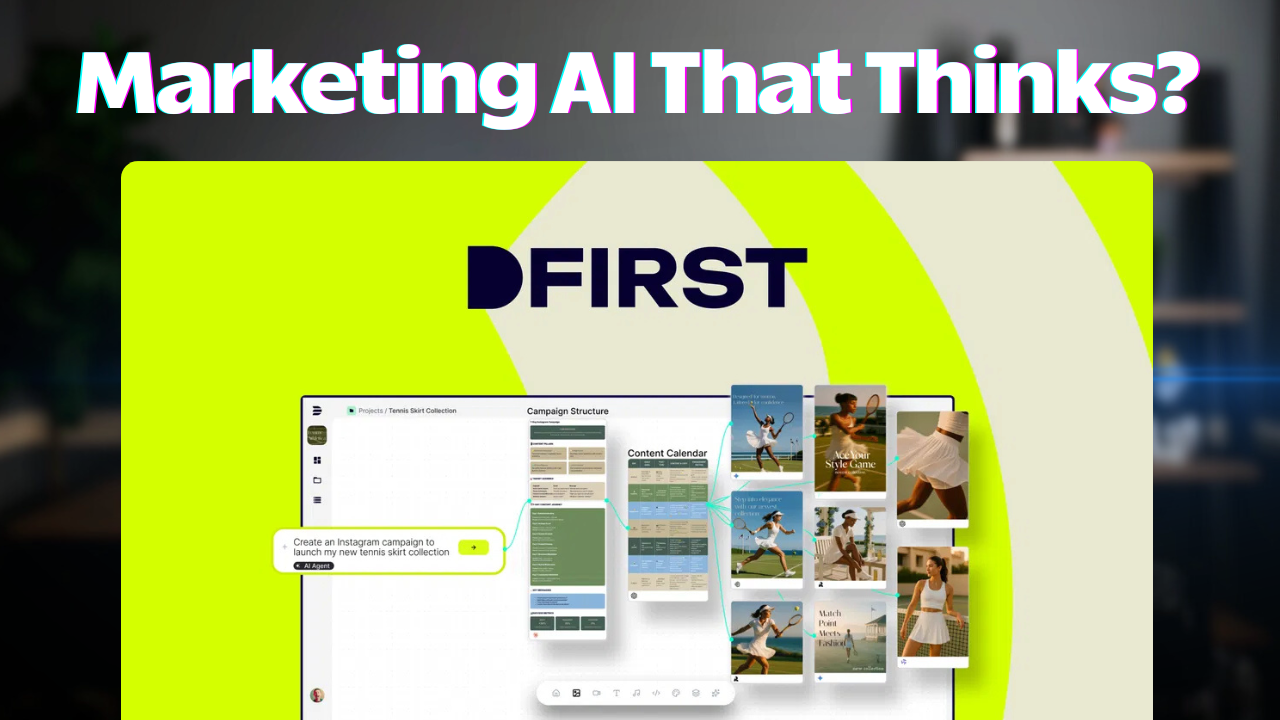
The platform revolves around a whiteboard and canvas concept where you can create, connect, and chain AI-generated assets together into complete marketing campaigns. Whether you need a Facebook post, an email newsletter, or an Instagram graphic, you can generate all of them from a single workspace without ever leaving the app.
It's available on AppSumo as a lifetime deal starting at $79 during AI Week, which runs until February 27th.
Image Generation
One of DFIRST's standout features is its image generation capabilities. The platform gives you access to a wide range of AI models, including Nano Banana, Nano Banana Pro, Flux, ChatGPT's image generator, and Quen. Standard Nano Banana costs just one credit per image, while Nano Banana Pro runs five credits per image but produces significantly higher quality results.

With Nano Banana Pro, you get readable text in generated images and much more detailed compositions. You can upscale to 4K resolution without any additional credit cost, which is a nice bonus. The built-in image editor lets you add text, stickers, remove backgrounds, and do basic Canva-style edits directly within the platform.
There's also a prompt enhancement feature that uses AI to expand your basic prompt into something much more detailed. It takes about 10-15 seconds, but the resulting images are noticeably better when you let the AI flesh out your instructions.
Out Painting & Advanced Image Features
DFIRST includes an out painting feature that uses AI to expand your images beyond their original boundaries. You can extend in any direction — proportionally or asymmetrically — and the AI fills in the missing parts based on a text prompt.
It costs around 14 credits per out painting operation, so it's not cheap, but the results can be impressive. This is particularly useful for turning square images into wide-format social media banners or creating more context around a subject.
Video Generation
Any image you create in DFIRST can be converted into a video, or you can start from scratch with the video generation tools. Multiple video models are available, including C Dance 1.5 Pro, Google Vio, and Cling.

Credit costs scale with video duration — a 5-second clip runs 90 credits, while a 12-second video jumps to 216 credits. Video generation takes about a minute compared to 20-30 seconds for a set of four images. Resolution can be boosted without affecting credit cost.
The built-in video editor lets you trim clips, add text overlays, captions, and stickers for quick social media content. It's not a full video editing suite, but it's enough to create short-form content without leaving the platform.
Canvas Mode & Workflows
The real power of DFIRST emerges when you switch from the simple feed view to the infinite canvas mode. Here you can see all your generated assets laid out spatially and connect them using workflow nodes.

For example, you can take an image, run it through a "describe image" node, feed that description into an "asset multiplier" that simultaneously generates a Facebook post, Instagram post, and email newsletter — all from a single source image. This daisy-chaining approach means you can build out entire campaigns without copying and pasting between different tools.
It does take some time to wrap your head around the canvas workflow, but once it clicks, it's a genuinely powerful way to create connected marketing assets at scale.
Workspaces & Data Room
DFIRST organizes everything into workspaces — one per product or brand is the recommended approach. Within each workspace, there's a Data Room with three sections: Documents, Products, and Strategy Hub.

In Documents, you can upload previous campaigns, brand assets, and reference materials in various file formats. The Products section lets you import inventory from Shopify or via CSV. Currently, Shopify is the only native e-commerce integration, though CSV import works as a workaround for WooCommerce or other platforms.
The Strategy Hub can automatically scrape your website to understand your brand voice, competencies, mission, and values. When all of this context is populated, the AI generates content that's much more aligned with your brand — which is where the real magic happens for repeat use.
Templates & Getting Started
DFIRST offers templates for common marketing workflows, like converting a video into a blog post or creating a social media campaign from a product image. There are currently about 11 templates available, which isn't a lot, but each one comes with an "about the workflow" section that explains how to use it.

These templates are genuinely helpful for understanding the platform's capabilities and getting past the initial learning curve. If you're feeling overwhelmed by the canvas mode, start with a template and follow the built-in steps.
Pricing & Which Tier to Buy
Pricing on AppSumo starts at $79, and the tier you choose determines which features and AI models you can access. Tiers 1-2 are limited to text and images only. Tier 3 adds video generation but only with basic models.

Tier 4 is the recommended sweet spot — it unlocks advanced models, the full image and video editor, and unlimited web scraping. Tiers 5-6 add more credits (up to 1,700 per month) and unlimited whiteboards. Credits renew monthly on all plans.
Even at the base level, the access to models like Claude Opus 4.6, Gemini 3, Grok 4, and ChatGPT 5.2 Pro makes it a solid value for text generation alone. Just make sure you check which models are included on your chosen tier before purchasing.
What I Don't Like
No review would be complete without the downsides. First, the hover-based navigation takes getting used to — you hover to interact rather than click, which means you'll accidentally dismiss menus constantly until the muscle memory kicks in.
Second, the prompt input window is too small. When working with enhanced prompts that can be paragraphs long, you can only see about two and a half lines at a time. For a tool that's all about prompting AI, this feels like an oversight.
Third, the learning curve is steep when jumping straight into canvas mode. My recommendation is to start in the simpler feed/flow mode, build up some assets, and then transition to the canvas for more complex workflows. The templates help, but there could be more of them.
Frequently Asked Questions
What is DFIRST?
DFIRST (formerly Digital First AI) is an all-in-one AI marketing platform that combines image generation, video creation, text writing, code generation, and campaign workflow tools into a single workspace. It uses multiple AI models including Nano Banana Pro, Claude, Gemini, and more.
How much does DFIRST cost on AppSumo?
DFIRST is available as a lifetime deal on AppSumo starting at $79. There are six tiers with pricing based on which features, AI models, and credit amounts you need. Credits renew monthly on all plans.
What AI models does DFIRST support?
DFIRST includes Nano Banana and Nano Banana Pro for images, C Dance 1.5 Pro, Google Vio, and Cling for video, plus text models like Claude Opus 4.6, Sonnet 4.5, Gemini 3, Grok 4, and ChatGPT 5.2 Pro.
Which DFIRST AppSumo tier should I buy?
Tier 4 is recommended for most users. It includes advanced AI models, the full image and video editor, unlimited web scraping, and 600 monthly credits. Lower tiers miss key features like video generation or the advanced editor.
Can DFIRST replace Canva?
DFIRST has a built-in image editor with basic Canva-like features including text overlays, stickers, and background removal, but it's not as full-featured as Canva for design work. Where DFIRST excels is in AI-powered generation and workflow automation that Canva doesn't offer.
Does DFIRST support video generation?
Yes, DFIRST supports AI video generation starting at Tier 3 with basic models and Tier 4 and above for advanced models. You can create videos from scratch or convert any generated image into a video. Costs range from 90 credits for a 5-second clip to 216 for 12 seconds.
What is the DFIRST infinite canvas?
The infinite canvas, also called the whiteboard view, is DFIRST's visual workflow editor where you can lay out AI-generated assets, connect them with workflow nodes, and chain operations together to build complete marketing campaigns from a single workspace.
Is DFIRST good for beginners?
DFIRST has a steeper learning curve than simpler AI tools. Start with the flow mode, which looks like a regular chatbot, to get comfortable generating content. Then transition to the canvas mode for more advanced workflows. Templates are available to help you get started.
Get Dave's Toolbox
The tools I actually use, every Tuesday. Free. No spam.
No cost. No spam. Unsubscribe anytime.