How to Run Claude Code Without Permission Prompts
Stop babysitting your AI tools. Here’s how to set up Claude Code to run without permission prompts — and why developers like Levels are doing it full-time.

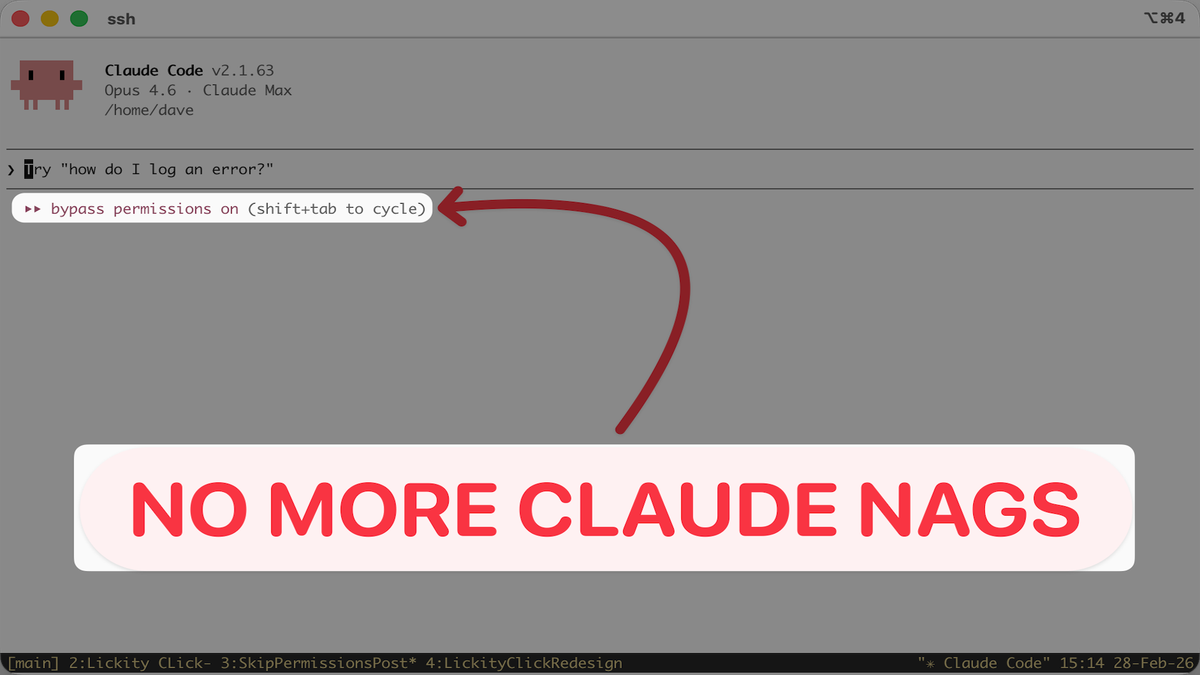

If you use Claude Code, you’ve felt the friction. Every file edit, every shell command, every little operation — Claude asks for permission. It’s like having a brilliant co-pilot who stops to ask “are you sure?” before every single turn.
There is nothing more annoying than walking away from your desk, coming back 15 minutes later, and finding Claude Code just sitting there waiting for you to click approve. Not working. Not building. Just… waiting. Your momentum is gone and you’re back to babysitting.
There’s a flag that fixes all of that: --dangerously-skip-permissions. And this isn’t some underground hack, it’s a built-in feature that more and more developers are adopting as their default mode. I’m running Claude Code in skip-permissions mode at least 90% of the time these days.
What Does It Actually Do?
By default, Claude Code operates in a supervised mode. It asks you to approve:

- File edits and creation
- Shell command execution
- Any system-level operations
The --dangerously-skip-permissions flag removes all of those prompts. Claude operates fully autonomously — reading, writing, running commands, and making changes without waiting for your sign-off.
In other words, you stop babysitting and let it work.
You could type this every time you launch Claude, but it's long and annoying. Sometimes I forget and the only way to activate it is to exit Claude code and try again with the flag.
If only there was a way to permanently switch this flag on... of course there is!
Levels Is Living in Skip-Permissions Mode
Pieter Levels (@levelsio) — the indie hacker behind Nomad List, Remote OK, and Photo AI — recently shared that he’s permanently switched to running Claude Code this way:
This week I decided to just permanently switch to running Claude Code on the server mostly on bypass permissions mode:
— @levelsio (@levelsio) February 28, 2026
c() { IS_SANDBOX=1 claude --dangerously-skip-permissions "$@"; }
And for the first time in my life I think I’ve actually managed to outrun my todo list
What… https://t.co/JcmkaACYJN pic.twitter.com/a1bDGCXJQa
He followed up with two important caveats:
This is a calculated risk. Levels runs each project on its own isolated VPS, keeps regular backups, and accepts the trade-off. The speed gain is worth it.
My Take
I’ve been running in skip-permissions mode for most of my Claude Code sessions for a few weeks now, and the difference is night and day. The tool just works. It reads files, edits code, runs commands, spins up servers, all without me hovering over it pressing Y every thirty seconds.
Of course I still use Plan mode for nearly every request (as should you!) and the shift from plan mode to Claude taking action still requires confirmation, but the number of prompts is now one... versus a million or whatever it is naturally.
Here is my take on it – if you’re not an actual developer, you're primarily vibe coding, and let's be honest you don’t have the technical ability to truly decide whether Claude is making the right choices, you’re at pretty low risk by just giving it permission for Claude to make a smart decision.
You were going to approve it regardless. The permission prompt was just slowing you down without adding real safety.
But always make sure you have backups. Use Git for version control so you can roll back. Keep things isolated. That’s the real safety net, not a confirmation dialog.
When You’d Want This
This makes sense when:
- You’re building on a development machine or throwaway VPS
- You have backups and version control in place
- You’re tired of approving every single file read and shell command
- You want Claude to work at the speed of thought, not the speed of “press Y to continue”
You might not want this on:
- Production servers with live customer data (although Levels does!)
- Machines without any backups or version control
- Shared environments where someone else’s work, or your other apps, are at risk