How to Build a Custom CRM with AI and No Code (Softr Tutorial)
Most CRMs charge you for features you'll never touch. Here's how I built a custom CRM with Softr — no code, no developer, and it took an afternoon.

Sign up for Softr with promo code DAVE to get your first month of the Pro plan for free!
Why most CRMs are a bad deal
Most CRMs are either overpriced and crammed with features you'll spend months learning, or cheap but so rigid you end up reshaping your whole workflow around their tool.
All you actually need is something that tracks deals, manages contacts, and keeps your team on the same page. That shouldn't cost $150/seat/month.
The better option is to build exactly what you need. With Softr, that's a realistic project. No developer, no code, and you don't need to sacrifice a weekend to get there.
What is Softr?
Softr is a no-code platform with AI built in. You can build real business apps with it, CRMs, internal tools, client portals, not just dressed-up spreadsheets.
It comes with a drag-and-drop builder, its own database, user permissions, hosting, and security. You build, Softr runs the infrastructure.
If your data already lives in Airtable, Notion, or Supabase, you can connect those too without migrating anything.
Start with a template, then make it yours

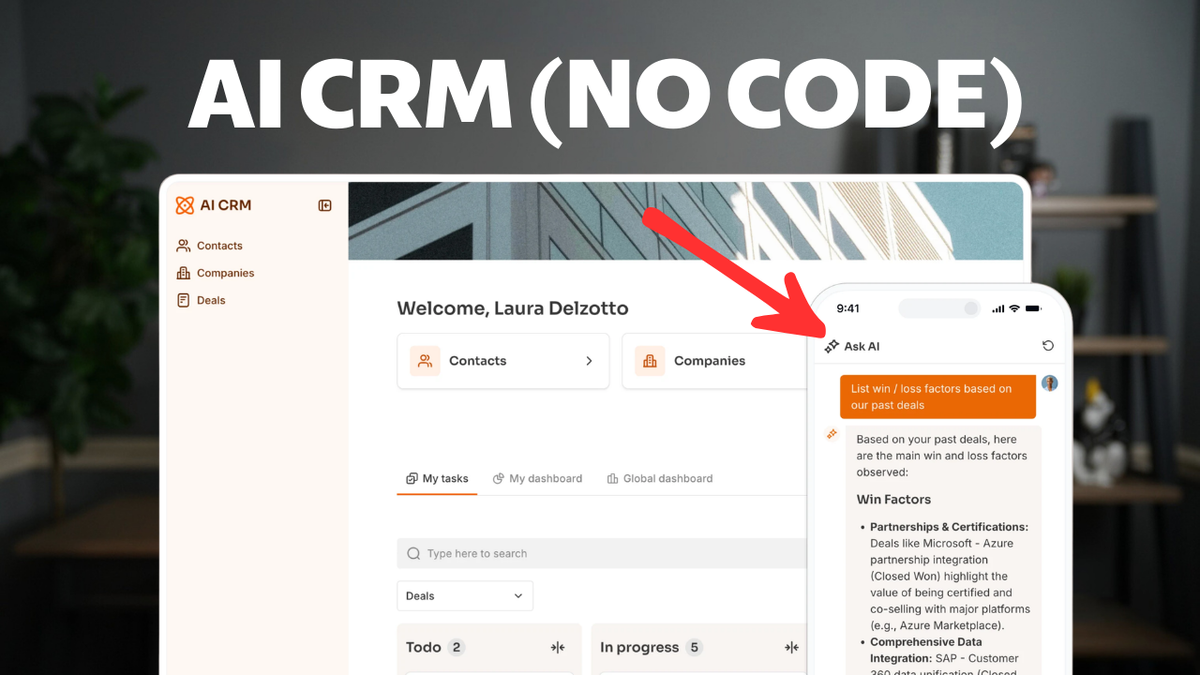
Softr has a template library that includes an AI CRM template. It gives you a working app out of the box: deals pipeline, contact management, user authentication, and a homepage, all wired together.
The template is a starting point, not a constraint. Every block, page, and database field is editable. You're just not staring at a blank screen on day one.
Pick your template, name the app, and Softr sets up the project. From there you're in the visual builder and can start changing things immediately.
Customizing your interface

Softr is built around blocks. A block is any element in the editor: forms, tables, hero sections, nav bars. Click one and its settings appear on the right.
Global styles (fonts, colors, button styles, spacing) are set in one place and apply across the whole app. You can override individual blocks when you need to.
To add content, click the plus button and pick from the block library. Some blocks pull from your database, others are static web content. Rearranging is drag-and-drop.
There's also an AI chat tab on each block. Describe what you want changed and Softr's AI modifies the block for you. Handy for tweaking things when you don't want to dig through every setting manually.
Building your sales pipeline

The Kanban board is where the CRM actually lives. It connects directly to your Deals table, and a Deal Stage field defines the pipeline columns.
Adding a new stage? Edit the Deal Stage field in the database, add a new option, and the column shows up in the Kanban automatically. The data model and UI stay in sync without rebuilding anything.
The cards are customizable. Pick which fields show up on each card (deal name, company, owner, amount) and reorder or swap them however you want.
Drag-and-drop between columns is a toggle in settings. Filters and search work the same way: pick a field, and Softr wires up the UI.
User management and permissions

User management is straightforward. Add users, assign them to groups (say Admins and Sales Reps), and those groups control what each person sees and does inside the app.
Visibility works at two levels. Page level: sales reps can't access the admin dashboard. Block level: they see the page, but a specific data block is hidden from them. No code needed for either.
There's a useful link between user groups and the database. Put someone in the Admin group and their role field in the database updates automatically.
For finer control, like restricting which users can create new records, that's available on the Business plan through global data restrictions.
The pre-launch checklist
A few things to check before you publish.
Custom domain: Softr gives you a subdomain by default, but connecting your own domain is one DNS record. Add it in your registrar, done.
SEO settings are per-page. Click the gear icon on any page for title, meta description, and Open Graph fields. Worth filling out before launch.
Authentication lives under the Users tab. You can enable email/password login, Google sign-in, magic links, or SSO. If you want users creating their own accounts, there's an open sign-up option with a custom onboarding flow.
Hit Publish and your app goes live at your custom domain once DNS propagates.
Two AI features worth knowing about
Softr has AI baked into the product, but two features are worth calling out specifically.
First: the Vibe Coding block. Describe what you want to build and Softr's AI builds it. I used it to create a CSV bulk import feature. Typed what I needed, and it generated the whole thing: drag-and-drop file upload, field mapping, review screen, everything.
Second: Ask AI. You can add it to any data block with a single toggle. No API keys, no configuration. Users ask questions in plain English ("How much is the Apple deal worth?") and the AI pulls the answer from your database. If you've got years of data sitting in the app, this is where it pays off.
Both feel like native features, not bolt-ons.
Softr pricing

The Pro plan is $139/month on annual billing ($167/month monthly) and covers 100 users. For most small and mid-sized teams that's plenty. Additional users are $10/month each.
The Business plan bumps you to 500 users and adds global data restrictions for tighter access control.
All plans include unlimited apps. One subscription, as many projects as you want.
There's a free 14-day trial. Use promo code DAVE at checkout to get your first month of Pro at no cost.
Should you build your CRM with Softr?
If your current CRM doesn't fit how your business actually works, this is worth trying. You pick the columns, the fields, the visibility rules, and you don't write a line of code.
The AI features pull their weight. Vibe coding covers the edge cases where built-in blocks fall short. Ask AI makes the data your team has been accumulating actually searchable by the people who use the app daily.
The pricing math works as your team grows. A hundred users on one subscription, unlimited apps. That covers most businesses that need more than spreadsheets but less than Salesforce.
Start with the free trial. Use code DAVE to get your first month of Pro free and see how it goes.
Frequently asked questions
Is Softr free to try?
Yes. There's a free 14-day trial. Use promo code DAVE at checkout to get your first month of Pro at no cost.
Do I need to know how to code to build a CRM with Softr?
No. Everything is built through a visual drag-and-drop editor. Interface, permissions, database connections, all point-and-click. The Vibe Coding block lets you add custom features by describing them in plain English.
Can I use my own domain with Softr?
Yes. Connect a root domain or subdomain by adding one DNS record in your registrar. Your app goes live at your custom URL once DNS propagates.
What databases can Softr connect to?
Softr has its own native database. It also integrates with Airtable, Notion, and Supabase if your data already lives there.
How does the Ask AI feature work in Softr?
It's a toggle you enable on any data block. No API keys or setup. Users type questions in plain language and the AI queries your database to return answers.
How many users does Softr's Pro plan include?
100 users for $139/month (annual) or $167/month (monthly). Extra users are $10/month. The Business plan covers 500 users and adds global data restrictions.
Get Dave's Toolbox
The tools I actually use, every Tuesday. Free. No spam.
No cost. No spam. Unsubscribe anytime.